Granting access early enables us to provide targeted guidance, streamline your preparation, and accelerate your audit readiness.
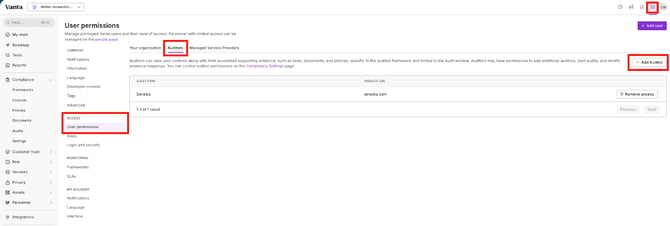
1. Navigating to Settings - User Permissions - Auditors - Add Auditor - add Sensiba as your audit firm.
2. Create your Audit Package
a) Go to the Compliance tab - select Audits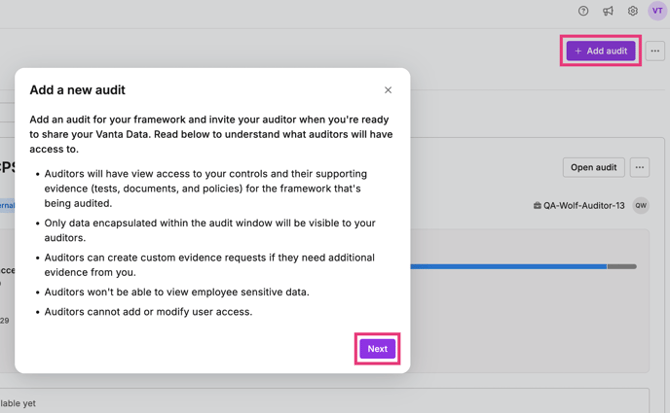
b) From here, select:
- Framework: SOC 2 Type 1 or Type 2 (depending on which audit you are doing first)
- Audit firm: Sensiba
- Audit period date:
- For SOC 2 Type 1: select today's date (this can be updated later if needed)
- For SOC 2 Type 2: select a 3 month observation window that you would like to work towards (this can be updated later if needed).
- Additional Frameworks:
- If you have engaged Sensiba to perform any other standards alongside your SOC 2 audit, such as GDPR or HIPAA, please follow the above steps selecting the applicable framework (this will be in addition to the SOC 2 audit you create).
c) Add your auditors:
- Auditops@sensiba.com
- Customer Success Manager
- Your lead auditor will be added by your CSM when you are ready to start.
Once completed the above steps, please notify your Customer Success Manager.
💡 If you would prefer to watch a step-by-step video, follow this link to a loom video.